
Showing posts with label Google. Show all posts
Showing posts with label Google. Show all posts
Friday, 31 July 2015

Saturday, 25 July 2015
Google Workshop on Internet Safety for Educators
Yesterday, I was fortunate enough to take part in Google Argentina's workshop for educators on Internet Safety. It is truly refreshing to see so many like-minded teachers willing to spend a whole morning during winter break to learn a few tricks to apply in class (and in daily browsing)
Internet safety is definitely something we all deem vital, but know very little of. These are some of the things I learned yesterday:
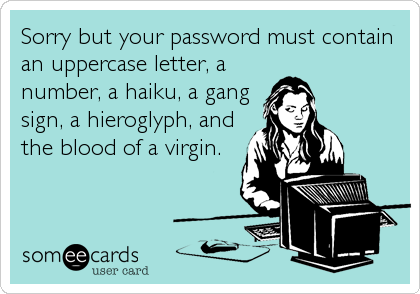
- Passwords: We need to stop thinking of passwords and start creating passphrases. For example, let's say your favorite book is One Hundred Years of Solitude. Your password could then be: OHYoS#1967 (the year it was written) This way, your password fulfills all the necessary requirements: 8 characters minimum, upper/lower case letters, special characters, and numbers. And, most importantly, you will remember it.
 |
| Source: http://www.someecards.com/ |
- Two-step verification: Enabling two-step verification is basically adding an extra layer of security to your account, especially those which have sensitive information. Every time you sign in, you'll be asked to type in your password and also include a specially generated code you'll be given. There's even an app to make your life easier. You can learn more about two-step verification here.
- Chrome Safe Search: By turning safe search on, you'll be making sure your students/kids will not be accessing inappropriate content. It is dead-easy to enable. You just need to visit your settings page. More detailed instructions here.
- Youtube Restricted Mode: Worried that your kids/class might watch something inappropriate on Youtube? You can replicate Chrome's Safe search by turning on Restricted Mode. You'll find this at the bottom of the home page. Interested? Click here for further instructions.

Wednesday, 22 July 2015
Computational Thinking
This week I started this online course on Computational Thinking. It is a self-paced course in which you can learn different problem-solving skills that can be applied in any field. I found it incredibly interesting, not just for class, but for real life as well. You can check it our on its official site.


Saturday, 6 June 2015
The Power of Connection
I have been fairly active on social media for some time. Whether on Facebook, Twitter or Google+ (my two favorite ways of building my PLN), I'd always made sure I check posts and keep up with the latest. But I kept having this feeling I was taking the back seat and not really participating actively. Well, that has definitely changed.
Early this year, I posted a question on a Google+ Community and immediately got all kinds of solutions to my problem. It still amazes me how many people are willing to give you a hand, even though they have no clue who you are. One of those teachers who replied was Reinhard, a German Science teacher. A couple of weeks later, he sent me a message, connecting me to a fellow Argentine teacher who was presenting in an ARTESOL conference in Buenos Aires. We ended up meeting for coffee thanks to someone we've never met on the other side of the Atlantic.
Fast forward two weeks and I'm taking part of my first Mystery Hangout, where I got to talk to people in the UAE, Oman, India, Argentina, Germany, the US. Mind blowing.
Once you start, there's no going back. Reinhard invited me to a second Hangout with a US teacher form Ohio who was doing a PD meeting and trying to introduce Mystery Hangouts to her colleagues. You can check out Sebastian's Slideshare of the Hangout here.
Teaching can be quite lonely at times and the Internet provides you with the possibility of reaching out to like-minded educators. Educators from which you can learn. And who can also learn from you.
Monday, 25 May 2015
June Workshop: GAFE (Google Apps for Education)
This year, I'm starting a series of monthly ed tech workshops.
The first one is starting soon! Couldn't be more excited.
The first one is starting soon! Couldn't be more excited.
Thursday, 25 September 2014
I'm a Google Educator!
Attending the GAFE Summit got me more than expected. The experience per se was phenomenal but not long after, I got an email offering a scholarship for the Google Educator exams.
And so, after some weeks of studying and falling asleep by the computer, I can proudly say I'm a Google Educator!

And so, after some weeks of studying and falling asleep by the computer, I can proudly say I'm a Google Educator!
Monday, 9 June 2014
World Cup Scavenger Hunt - 7th grade
Practically all of my students are football fans and the World Cup was just too big to pass up. Even my 7th graders who are usually not so keen on football had a hard time escaping the craziness that swept the country. Hey! Even I had a hard time doing so!
So with that in mind I decided to include it in my lesson plan.
First, I created an online scavenger hunt using Google Docs. I divided them in groups and provided them with questions to Google (eg Which country won the first World Cup? How many World Cups did Argentina play? Which country won the most World Cups?) Each team had to find out the information and complete it in the shared document which was being projected on the Interactive Whiteboard. The team that got all the answers correct first, would win.
Pros and cons of the activity
Pros:
With this activity, students were able to develop search skills. I noticed some of them were totally clueless as to how to conduct a proper search. I helped them out by directing them to verified sites or choosing more appropriate search words.
By working in groups, it allowed them to compensate for whatever they were lacking: comprehension skills, search skills, use of the computers. Most of the times, they would call me for help and end up helping one another instead while I 'supervised'
Cons:
Using a single shared document (and having it projected on the IWB) proved to be an excellent opportunity to tackle some issues. One of the fastest teams participating in the scavenger hunt, decided to get the upper hand by deleting other teams' responses. So it was the perfect opportunity to discuss some digital citizenship elements, such as proper online conduct and respect for other people's work.
Given the competitive nature of the activity, English was definitely not the language used for communication (not even for the search itself) I was not terribly worried about that, because when the time came to share the results, English had to be spoken.
All in all, it was a great activity. It paved the way for the World Cup Project I have in mind for them.
Sunday, 8 June 2014
GAFE Summit
This just keeps getting better and better!
I was fortunate enough to attend Argentina's first GAFE Summit. Organized and led by EdTechTeam, the one-day workshop focused on how to incorporate Google products in our lessons. Presenters Juan de Luca and Stephanie Cerda did an extraordinary job and I'm glad I was a part of it.

I was fortunate enough to attend Argentina's first GAFE Summit. Organized and led by EdTechTeam, the one-day workshop focused on how to incorporate Google products in our lessons. Presenters Juan de Luca and Stephanie Cerda did an extraordinary job and I'm glad I was a part of it.
Sunday, 17 November 2013
Heaven. Google Heaven.
I had the pleasure today of attending Google Argentina's first educational event. Together with Fundación La Nación, they organized a full day event at their headquarters in Puerto Madero: "El rol de la Tecnología en la Educación de la Era Digital" (The role of technology in education in the digital age)
I was invited, thanks to my fairy godmother Gladys, to present a project I had done with my students using Google Apps. A day of Googling, attending interesting presentations and showing off my work? I'm in!

I was invited, thanks to my fairy godmother Gladys, to present a project I had done with my students using Google Apps. A day of Googling, attending interesting presentations and showing off my work? I'm in!
Subscribe to:
Posts (Atom)
LinkWithin
